A practical guide for Local Authorities, agencies, and partners who need better visibility of their assets and programmes.
Why the status quo is under pressure
Local services are pulled in two directions at once. Demand climbs while resources stay flat. About 55% of the world’s population already lives in urban areas, and this is projected to rise to around 68% by 2050. That is more people depending on local roads, drains, housing, parks, and utilities that were never designed for this level of use.
Across OECD countries, subnational governments are responsible for close to 60% of total public investment, much of it in infrastructure. Regions, cities, and Local Authorities carry the real delivery risk, but they do so with tight budgets, recruitment problems, and a long list of national and local targets.
If you work in highways, drainage, housing, parks, or corporate GIS, the pattern is familiar. There are more assets to manage, more intense rainfall, more scrutiny from regulators and auditors, and louder expectations from residents and councillors. When a pothole claim, a flood, or a housing safety incident hits the headlines, people expect clear answers in days, not months.
Trying to manage that world with scattered spreadsheets, an ageing web GIS, manual inspections, and a pile of PDFs is not just awkward. It makes it hard to prove that you are doing the right jobs in the right places. GIS Cloud exists for this gap: one live, online map where assets, inspections, risks, and works come together in a way that Local Authorities and their partners can actually use.
The current problem – scattered data and reactive decisions
Most councils and agencies do not lack data. The problem is where it lives and how hard it is to join up.
Highways may hold condition layers in a corporate GIS. Drainage teams keep gullies and manholes on a shared drive. Parks rely on a contractor system for trees. Housing has repairs data locked in a housing management platform. Spatial information sits in different systems, with different IDs and standards. Nobody owns the full picture.
Publishing public-facing maps adds another layer of frustration. A simple consultation map or works viewer can mean tickets to IT or a specialist GIS admin. Viewers are hard to keep accessible and mobile-friendly. Many teams fall back to static PDFs which go out of date quickly and trigger complaints when residents spot errors.
IT departments see the pressure but are wary of building and hosting yet another custom GIS stack. They want a secure SaaS that sits cleanly alongside existing cloud investments, rather than a bespoke application that will need constant patching.
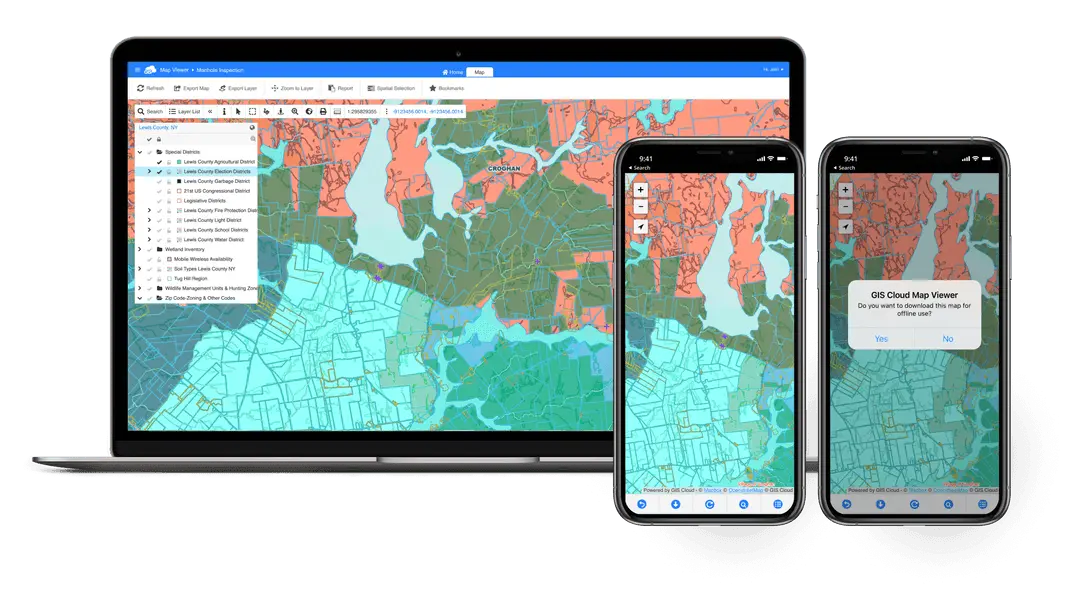
Licensing is messy. Tools sold per named user make it expensive to give proper access to internal colleagues, consultants, and contractors. A small group of “power users” get full access, while everyone else works from screenshots, exports, and email attachments.
In the field, mobile capability is weak or missing. Inspectors still use paper, generic survey apps, or improvised camera workflows that are not tied to the asset base. Photos and notes live on phones or shared drives rather than in a structured database. Field work remains clunky, and office staff retype and clean data instead of analysing it.
When a councillor asks why a specific road, estate, or park is still a problem after repeated complaints, the honest answer is often: “We need to pull a few systems together and check.” In a world of growing backlogs, that answer does not feel good enough.
A highways and drainage example
Take a county in the north of England dealing with repeat surface water flooding on a busy B-road. Residents send pictures of cars wading through water. The local paper runs the story. Scrutiny members ask for a clear explanation and plan.
Highways and drainage teams pull gully locations from an old survey, cleaning routes from a contractor spreadsheet, flood complaints from the CRM, and CCTV findings from PDF reports. A GIS officer exports layers from QGIS that do not quite match the latest asset register. Everyone works hard, yet it still takes days to answer basic questions like “Which gullies in this catchment have not been cleaned in the last year?” and “Where do poor-condition assets line up with repeat complaints?”
This is happening against a national backdrop where the maintenance backlog on local roads in England has been estimated at about £15.6 billion in 2023–24 and is still growing. When you are carrying a slice of that backlog, every misdirected visit and blind spot hurts.
A water and leakage example
Water services face the same visibility gap. In 2023–24, water companies in England and Wales leaked an average of 48.8 litres of water per person per day. Regulators and the public expect firm plans to cut that loss.
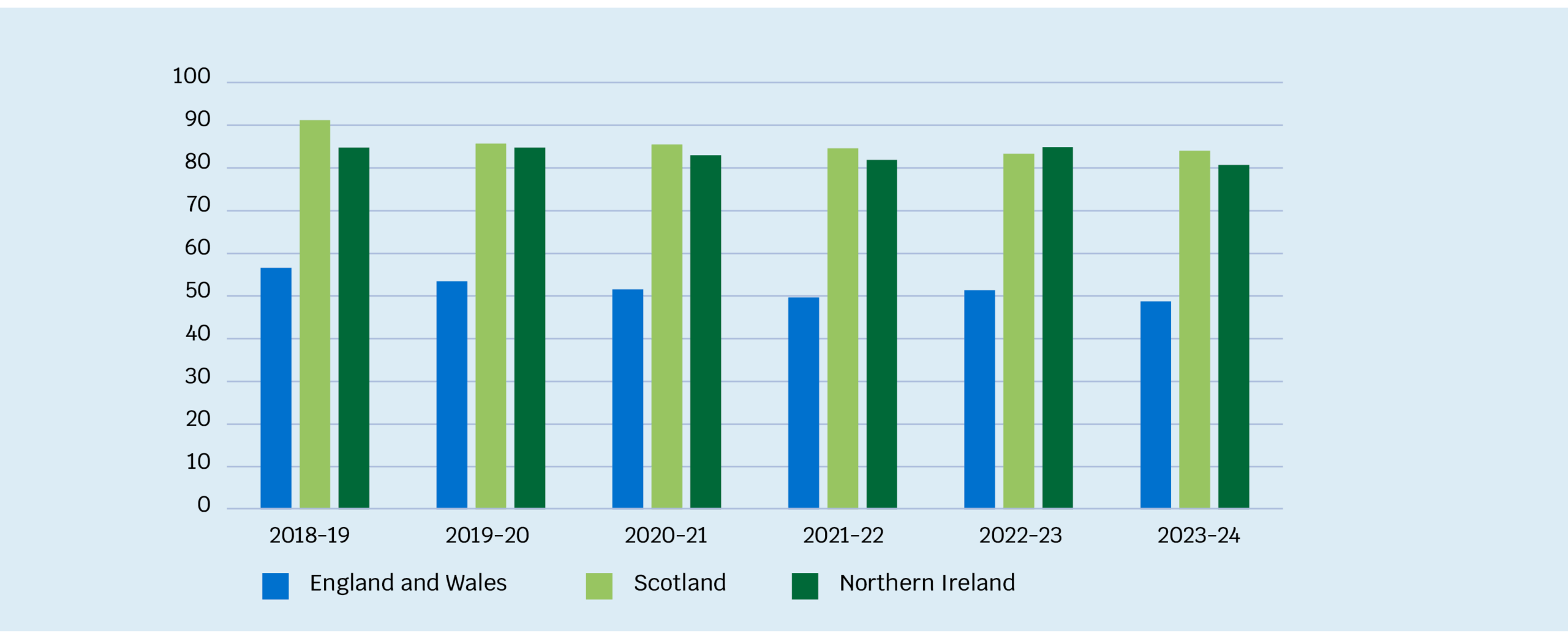
Source: Ofwat, using data from Ofwat, Scottish Water APRs, Northern Ireland Water APRs and ONS population data.
Local Authorities, internal drainage boards, and utilities often lack a joined-up spatial view of where assets sit, how they perform, and where repeat incidents happen. Asset data, incident logs, and planned works live in different places. Teams respond to each event but struggle to show that they are consistently targeting the worst hotspots.
In both examples, decisions rely on partial information, long-term memory, and whoever shouts loudest in a meeting. That is reactive working, not planned, risk-based asset management.
The GIS angle – what changes when everything is on one map
The key question is simple: what happens when you can see assets, inspections, risks, and works on one live map instead of across ten tools and twenty folders?
Once that map exists, patterns emerge that you could not see before. Housing blocks with repeated damp complaints stand out near known drainage constraints. Serious road defects cluster on a bus corridor that also has frequent utility works. Tree-lined streets with old inspection dates sit next to busy play areas.
GIS is the engine behind that map. For Local Authorities and agencies, the value is practical:
- faster, more confident decisions
- fewer wasted visits
- stronger evidence for funding bids and safety cases
- and public and partner maps that stay closer to reality

GIS Cloud is built to provide that shared map without another heavy on-premise stack. It runs as a SaaS platform and can integrate with your existing cloud environment, often based on Azure or similar, using open APIs and secure connections.
Its core products each have a clear role. Mobile Data Collection lets field staff capture inspections, defects, and photos with GPS and structured forms, including offline. Map Editor gives GIS and data teams control over layers, schemas, styling, and permissions in the browser. Map Viewer lets internal users explore live maps, turn layers on and off, and query data without needing full GIS training. Map Portal provides public-facing or partner-facing maps from the same source while keeping sensitive information restricted.
Many councils and agencies already pair GIS Cloud with QGIS. Analysts continue to use QGIS for heavy editing and analysis. They publish layers into GIS Cloud, where Map Editor, Map Viewer, and Map Portal handle web publishing and daily access. Mobile Data Collection feeds fresh data back into those layers. This hybrid model respects existing skills and licences while fixing two common weaknesses: mobile work and easy web access for non-specialists.
How GIS Cloud supports real workflows
Highways and streets – from potholes to planned resurfacing
On highways, the pressure is not just fixing complaints. It is explaining why one road gets resurfaced while another waits, using evidence rather than instinct.
With GIS Cloud, inspectors use Mobile Data Collection on phones or tablets along their routes. They record potholes, edge failure, rutting, and other defects with severity and photos, tied to the correct road segment. If there is no signal, data syncs later.
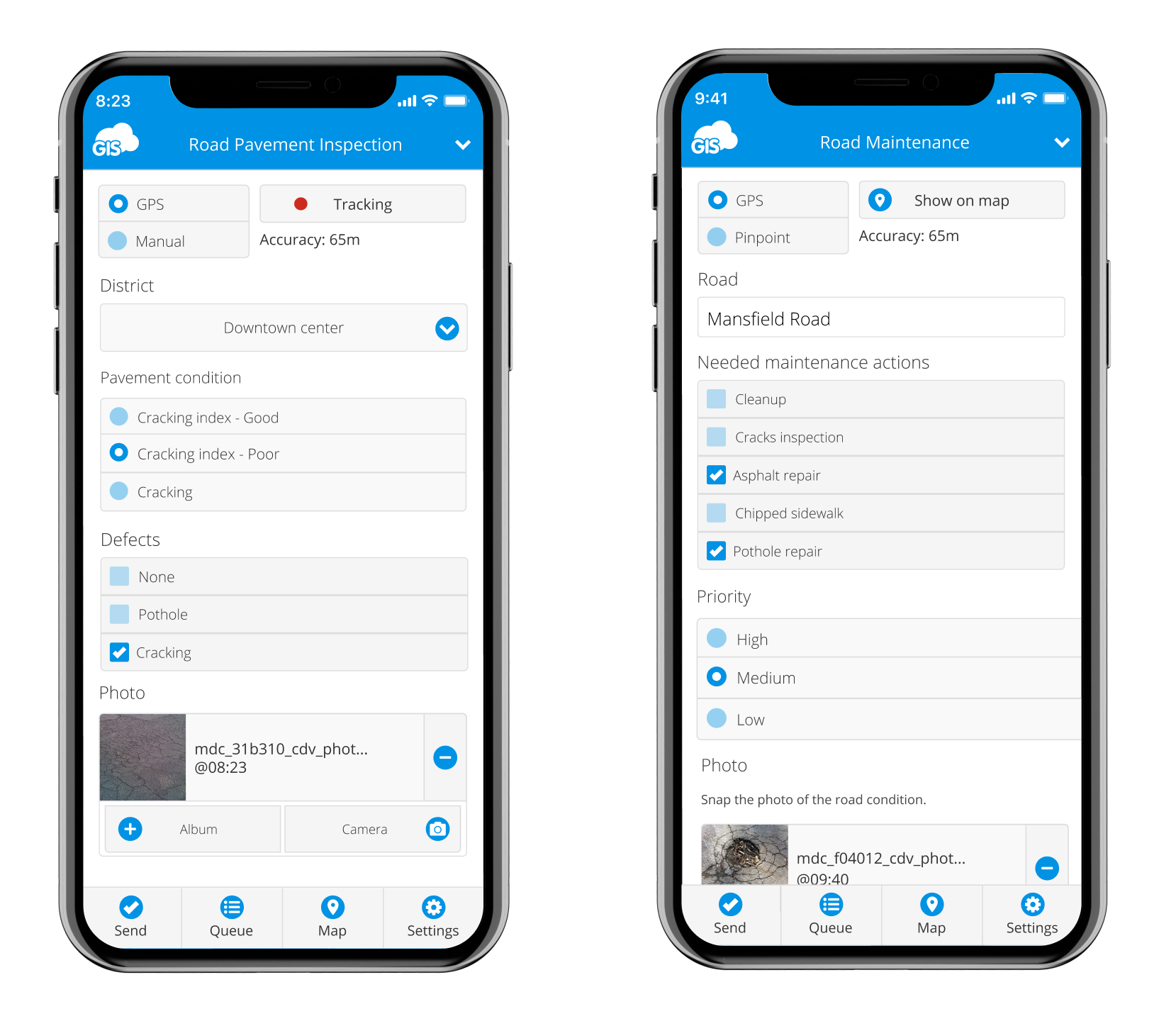
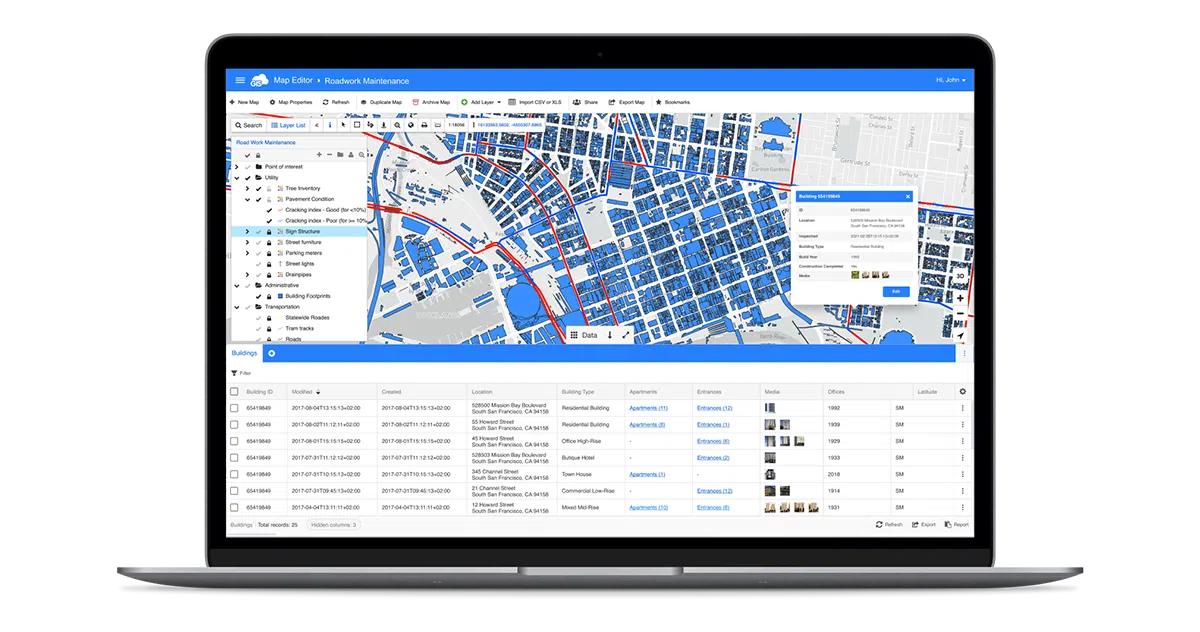
In the office, inspections appear on shared maps in Map Editor and Map Viewer. Highways managers filter for severe defects on strategic routes and check trends by ward. Clusters of serious issues become obvious and can be grouped into works packages instead of scattered jobs.
GIS staff use Map Editor to adjust schemas, add risk scores, and set up views for different programmes, such as safety repairs or capital resurfacing, without leaning on IT. When members ask for a map of the worst roads in their division, Map Viewer and Map Portal can provide a controlled view from the same data.
Drainage and water – targeting the real hotspots
Drainage and water management depend on knowing where assets, incidents, and planned works intersect.
Teams start by consolidating records of gullies, manholes, culverts, and other assets into GIS Cloud via Map Editor. Some data comes from QGIS, some from spreadsheets, some from CAD. Once loaded and given consistent IDs, it becomes a usable base map.
Field staff use Mobile Data Collection for inspections. Each visit records silt level, condition, access issues, and whether cleaning was done. Flooding incidents and “ponding” reports are logged on the map. Over time, Map Viewer reveals where poor-condition assets and repeat incidents overlap, especially near hospitals, schools, or key junctions.
Engineers plan CCTV surveys and jetting based on risk rather than fixed routes. Works plans appear as layers in Map Editor and can be shared through Map Portal with water companies or neighbouring authorities.
Parks, trees, and street scene – safer and cleaner public spaces
Parks, trees, and street scene services live under constant public and political attention. A serious tree failure, an unsafe play area, or persistent litter can escalate fast.
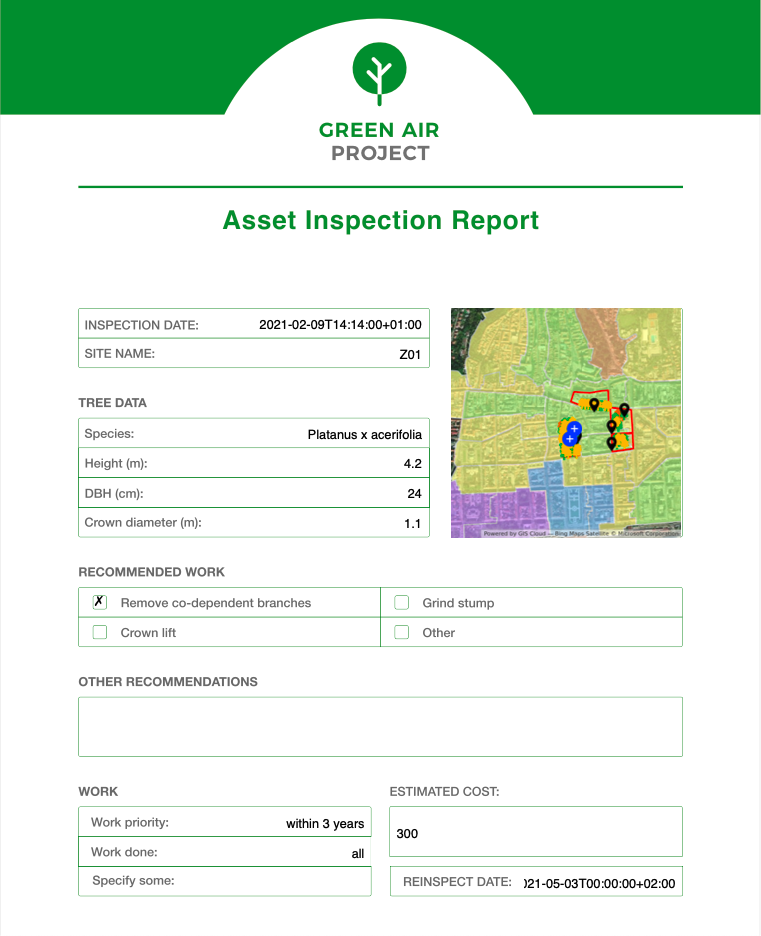
Tree officers maintain an inventory in Map Editor or QGIS and carry out inspections with Mobile Data Collection. They log structural defects, disease signs, and recommended works on site. Parks and playground staff use similar forms for equipment checks and damaged furniture. Street scene teams record overflowing bins and graffiti.
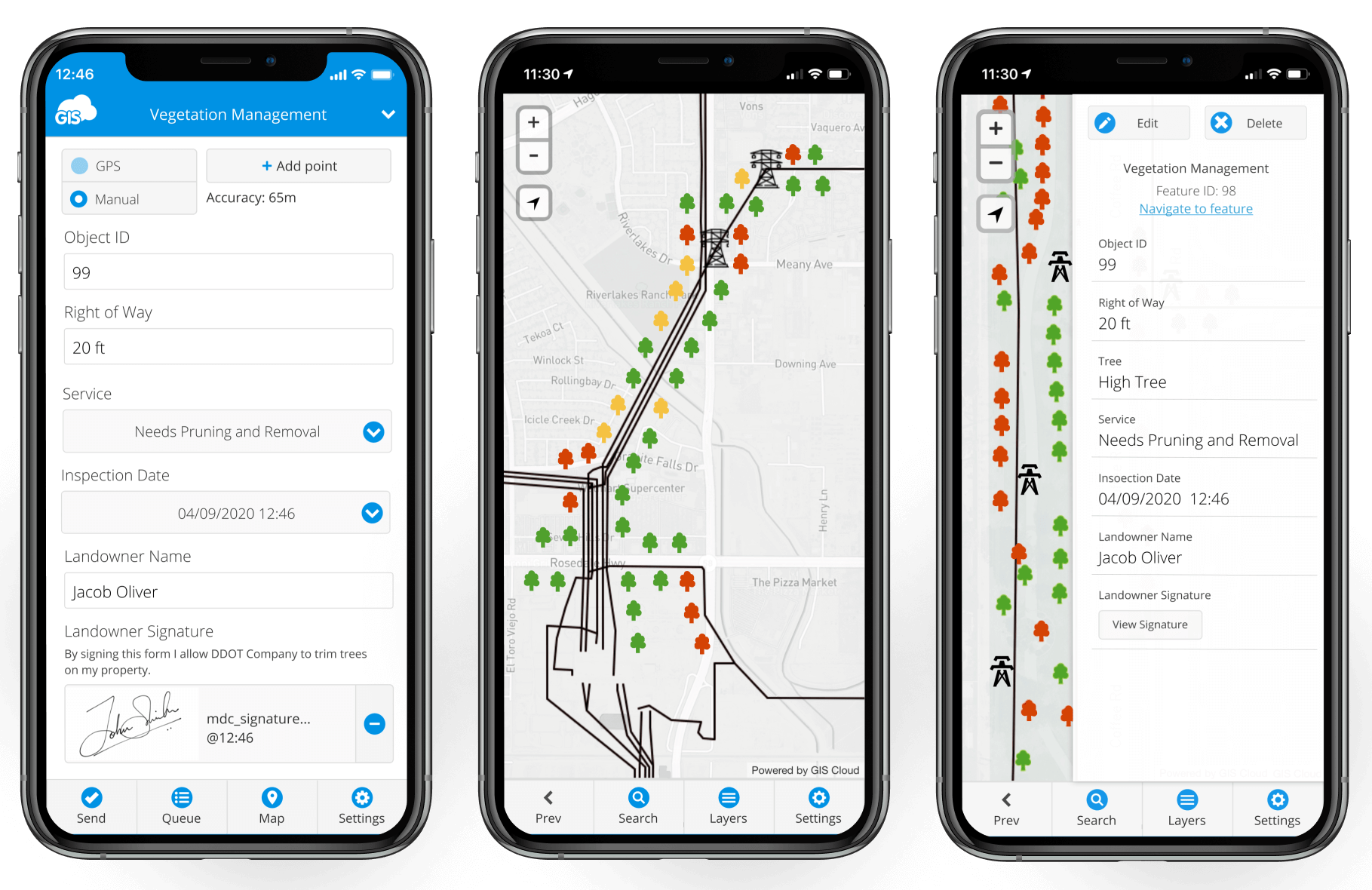
All this flows into one map. Supervisors open Map Viewer and see which trees have high-risk scores and overdue inspections, which playgrounds need follow-up, and which streets show repeated problems. They plan rounds that mix tree works, play inspections, and cleansing in the same area.
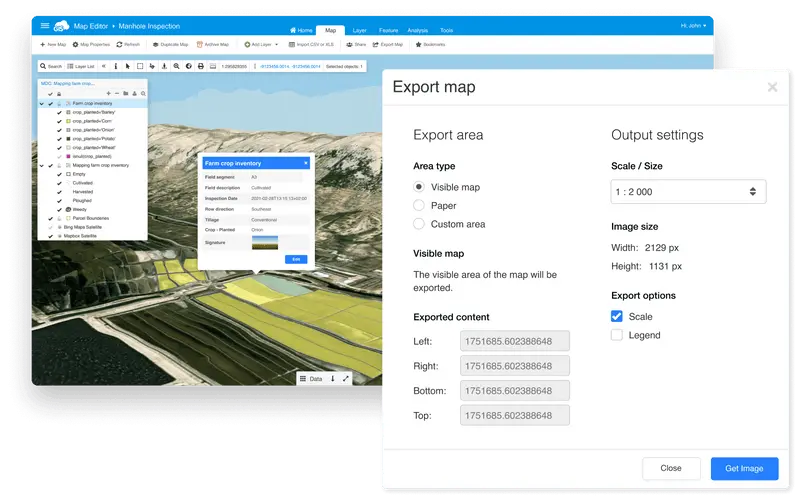
Through Map Portal, councils can publish selected layers, such as play areas, parks, and live improvement projects, from the same source. Public maps stay closer to reality because they draw from the same live data that field staff update.
Practical steps – starting small with GIS Cloud
The most successful Local Authorities do not begin with a grand multi-year plan. They start with a focused pilot.
- Pick one high-impact use case.
Choose something concrete and visible: gullies on a flood-prone corridor, potholes in a town centre, or tree inspections around schools. - Bring existing data into one project.
Export what you have from QGIS and other systems. Use Map Editor - Create a simple field form.
Build a Mobile Data Collection form that matches how crews speak. Keep mandatory fields to essentials so it feels faster than paper. - Pilot with a small group.
Involve a handful of inspectors, supervisors, or contractor staff. Training should focus on how the new workflow reduces double entry and protects them when there are queries. - Run the pilot for a set area.
Use one route, ward, or cluster of estates for a few weeks. Check data quality in Map Viewer, refine the form, and start using a simple manager view in real meetings.
Capture stories and numbers.
At the end, collect evidence such as fewer missed assets, quicker reports, and clearer responses to councillors. Use that evidence to justify expanding the scope or connecting to other systems.
Common hurdles and how to handle them
Certain worries come up in almost every organisation.
“Our data is too messy.” Waiting for perfect data keeps you stuck. Use GIS Cloud as the place where data improves. Import what you have and let Mobile Data Collection add structure and better locations over time.
“Staff will not adopt another system.” Adoption improves when people see less paperwork and clearer protection. If inspectors know that entering data once on a device means no retyping and fewer disputes later, they are more likely to engage. Start with a small group, listen to feedback, and adjust forms quickly.
“We already have corporate GIS and asset systems.” That is normal. Think of GIS Cloud as the layer that makes those systems usable for more people. Keep QGIS and existing asset databases where they make sense, and use GIS Cloud for mobile work, browser-based editing via Map Editor, and sharing through Map Viewer and Map Portal.
“IT only wants SaaS that fits our cloud strategy.” GIS Cloud is delivered as a managed service. There are no new servers to build and patch, and it can sit alongside your existing tools. Connections use APIs rather than custom installations.
“Licensing is already a nightmare.” A platform like GIS Cloud makes it easier to distinguish between editors, internal viewers, and public access. Consultants and contractors can be brought in without handing out full desktop licences, and public access is handled through Map Portal instead of ad-hoc workarounds.
Conclusion and next step
Local Authorities, government agencies, utilities, and civil engineering partners carry major responsibilities for roads, drains, housing, and public spaces. They also carry the political and financial risk when things go wrong. Urbanisation, climate pressure, and ageing infrastructure are not going away.
You cannot manage what you cannot see. When spatial data sits in silos, public maps are hard to publish, mobile capability is weak, and every small change needs a ticket, it becomes almost impossible to run a planned, risk-based service.
GIS Cloud for local authorities offers a different pattern:
- Mobile Data Collection raises the quality of field data.
- Map Editor lets GIS and data teams shape and control layers without leaning on IT.
- Map Viewer puts a clear interface in front of officers and managers who just need answers.
- Map Portal makes it realistic to share selected maps with residents and partners from the same live source.
Used on its own or in a hybrid model with QGIS and your existing cloud stack, GIS Cloud gives you what many teams have been asking for: a modern, cloud-based platform that fits governance and security requirements and makes it realistic to move away from scattered spreadsheets and siloed systems.
You do not need a big-bang “smart city” programme. One asset group, one corridor, or one estate is enough to show that working from a single live map reduces surprises and strengthens your evidence base.
If this sounds familiar in your highways, drainage, housing, parks, or utilities team, the next step is straightforward: talk to us about piloting GIS Cloud for one asset group so your teams, contractors, and management can finally work from the same live map.