
Publish ArcMap maps to GIS Cloud,
then just ask
Bring your Esri ArcMap maps online. Publish layers and symbology to GIS Cloud without rebuilding anything, then keep working on them in plain language: run analysis, build forms, collect field data, create apps and reports, all with AI, on live maps your team and stakeholders can see.
- Publish straight from ArcMap (.mxd)
- Layers and symbology preserved
- Share online and collect in the field
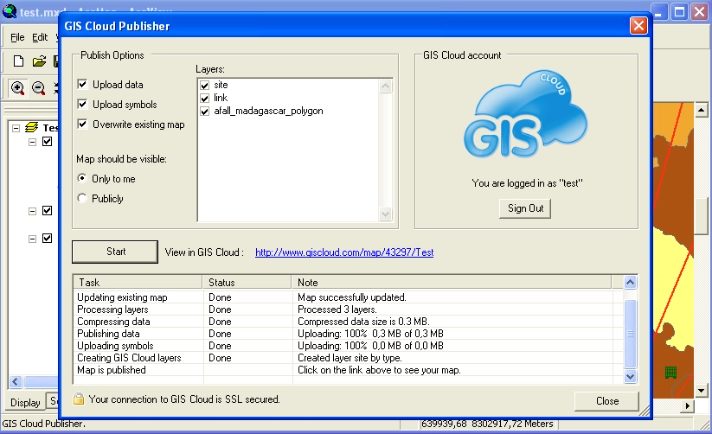
Publisher for ArcMap
From ArcMap to live web maps
ArcMap add-in
Publish from inside ArcMap: your existing Esri documents become live web maps without a rebuild.
Symbology preserved
Layers and styling carry across, so the online map matches your ArcMap document.
Extend Esri to the field
Add mobile collection and easy sharing on top of the maps you already maintain.
"The easiest GIS platform to get started with: a browser-based, full-featured interface with transparent pricing and security compliance."

Publish without rebuilding
Your ArcMap document goes online as-is, with layers, structure and styling intact.
- Publish .mxd layers directly
- Preserve symbology and labels
- Re-publish to push updates
Add field & sharing superpowers
Keep ArcMap for desktop work; gain mobile and web reach with GIS Cloud.
- Collect updates with Mobile Data Collection
- Share live via Map Viewer and Map Portal
- Control access per user or group

One source, many audiences
A published map is ready for the whole GIS Cloud toolset.
- Edit and style in Map Editor
- Private viewer for stakeholders
- Branded public portal in minutes
Powered by GIS Cloud AI
Esri maps, now conversational
Published ArcMap layers live in GIS Cloud, where Ask AI can query, classify and build views in plain language. Your Esri work, extended with an assistant: you review and confirm.
Explore GIS Cloud AIDo more with your data
Extend to other GIS Cloud apps
Publish your ArcMap
documents online
Install the add-in and share your first Esri map online today. No credit card, no setup.