If you manage spatial data at any scale, you’ve needed to update multiple features at once. Change a status field across 200 inspected assets. Set a date on everything in a construction zone. Mark a batch of records as verified.
Every major GIS tool handles this differently — and the differences matter more than you’d think.
We just launched bulk editing in GIS Cloud, so we thought it was a good time to do an honest comparison: how does bulk editing actually work across the tools teams use most?
The tools we’re comparing
- GIS Cloud — online GIS platform (Map Editor, browser-based)
- ArcGIS Online — Esri’s cloud platform (Map Viewer and Web Editor, browser-based)
- Fulcrum — field data collection platform (browser-based)
- QGIS — open-source desktop GIS
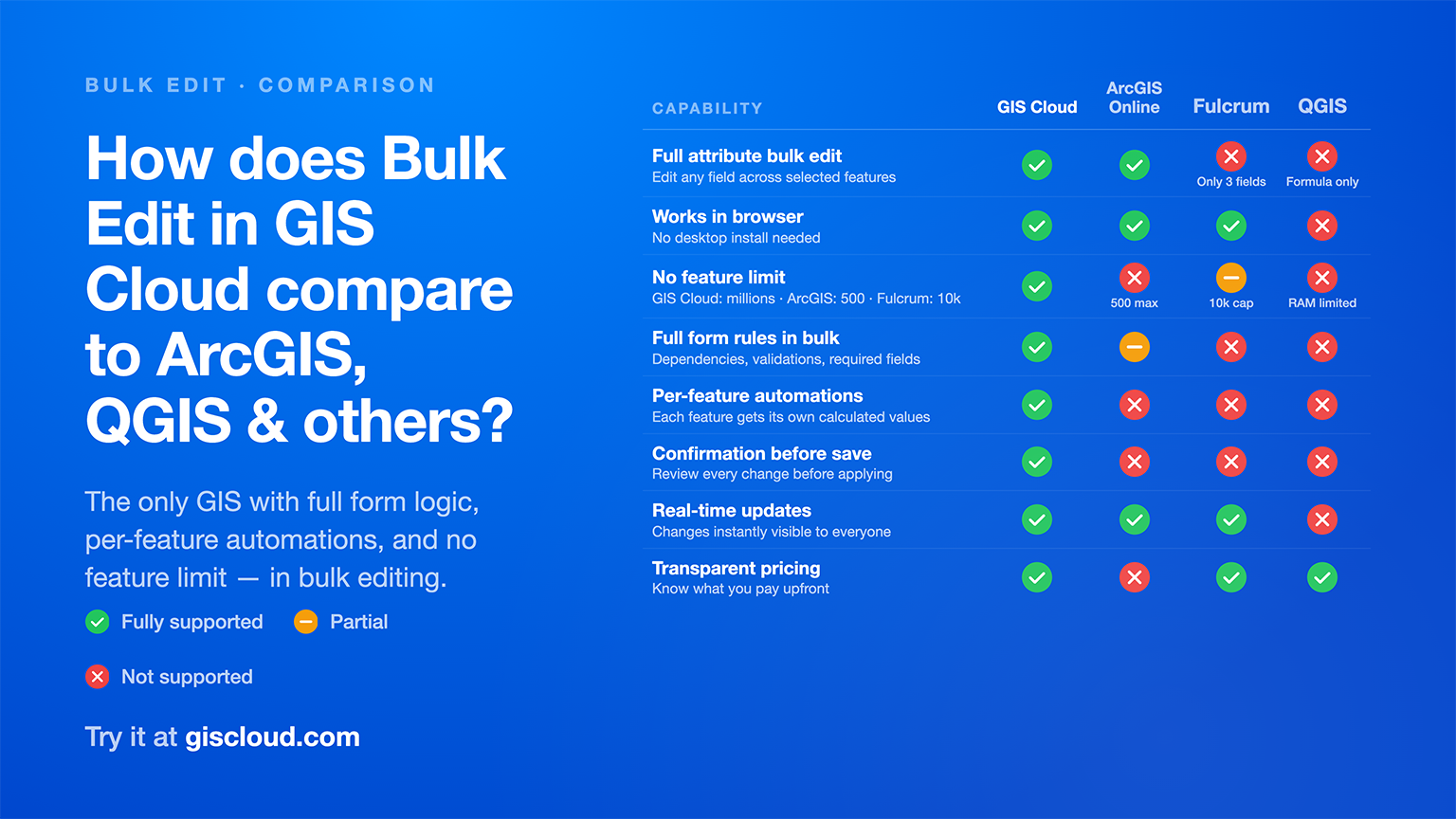
1. Can you edit all attributes in bulk?
GIS Cloud: Yes. Any field in your form — text, numbers, dropdowns, dates, checkboxes, radio buttons, file attachments — can be edited across all selected features at once.
ArcGIS Online: Yes. Since February 2025, ArcGIS Online supports batch attribute updates in the Web Editor, expanded to Map Viewer in June 2025. Supports editing attributes across selected features with form layout visible.
Fulcrum: Limited. Bulk actions cover only three fields: Status, Assignment, and Project. For full attribute editing across records, Fulcrum recommends CSV export and re-import.
QGIS: Not form-based. QGIS offers the Field Calculator for bulk attribute updates, but this is a formula-based approach applied to the attribute table — not a form with field rules. Useful for calculated columns, less so for structured data entry workflows.
2. Is there a feature limit?
This is where the differences get serious.
GIS Cloud: No enforced limit. We’ve tested with millions of features. Select as many as you need — the form opens, the logic runs, the save completes. In the browser.
ArcGIS Online: Maximum 500 features per bulk edit operation. If your layer uses certain ArcGIS Arcade expressions, the limit drops to 50 features. For larger datasets, you’d need to batch your edits or use other tools.
Fulcrum: Up to 10,000 records per batch action — but only for the three supported system fields (Status, Assignment, Project). Custom form fields can’t be bulk edited.
QGIS: Limited by your machine’s RAM and processing power. Works well for moderate datasets on a capable machine, but it’s desktop-bound — no browser access, no real-time collaboration.
3. Do form rules work during bulk editing?
This is the capability that surprised us most when we looked at the competition. Form rules — dependencies between fields, required field validations, read-only protections — are critical for data integrity. When you’re editing 200 features at once, you need those rules more than ever, not less.
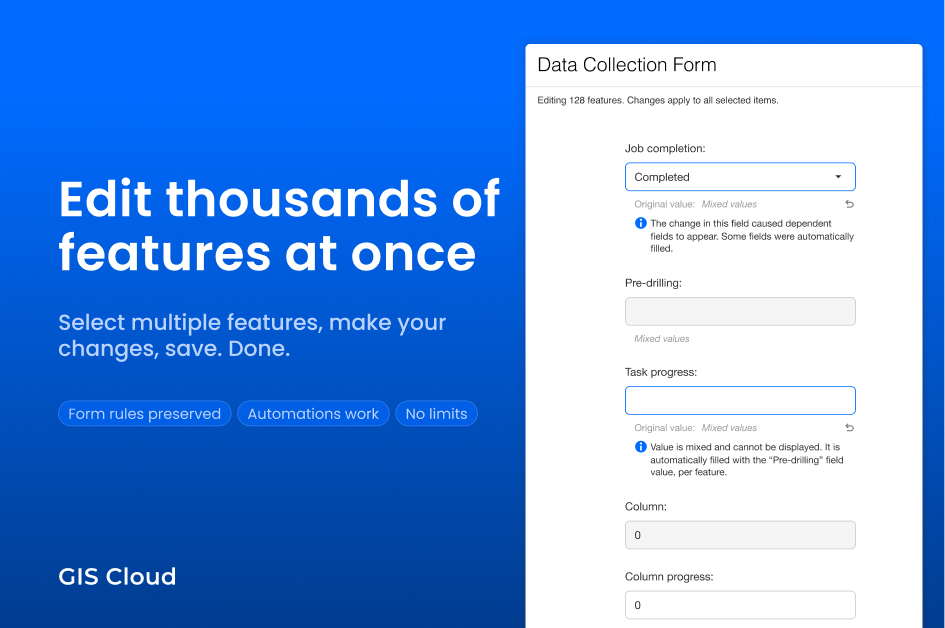
GIS Cloud: Full support. Dependencies, automations, required fields, read-only fields, and validations all work during bulk editing — exactly as they do in single-feature editing. No exceptions. If a parent field change reveals dependent child fields, those fields appear. If an automation condition is met, the target field auto-fills. Required fields block save if empty. This all happens live in the form, before you click Save.
ArcGIS Online: Partial. Esri states that when a form is configured on a layer, the bulk edit interface shows the form layout “with a few exceptions.” The documentation doesn’t specify which rules are excluded, but layers using Arcade-based form logic face the 50-feature limit noted above.
Fulcrum: No form logic in bulk. The three supported bulk fields (Status, Assignment, Project) don’t involve form rules.
QGIS: No form logic in bulk. The Field Calculator operates on raw attribute values, not through the form interface.
4. Do automations resolve per feature?
Here’s a scenario that happens daily in field operations: you select 200 solar panel racks and set their status to “Completed.” Each rack has a different quantification value — area, capacity, inspection count. An automation should calculate a progress percentage based on that rack’s own data.
The question is: does each feature get its own calculated result, or does the system apply one blanket value to all 200?
GIS Cloud: Per-feature resolution. Each feature’s automations are evaluated individually with that feature’s own data. Set 200 features to “Completed” and each one gets its own progress calculation, its own date stamps, its own derived values. This was a hard requirement from our client Vena Energy for solar farm inspection workflows — and it’s how we built it.
ArcGIS Online: Not documented. The bulk edit documentation doesn’t mention per-feature automation resolution. Standard ArcGIS Arcade calculations in forms may apply, but per-feature conditional auto-fill during bulk operations is not a described capability.
Fulcrum: Not applicable (bulk edit doesn’t cover calculated or automated fields).
QGIS: The Field Calculator can apply formulas per-row, but this is a manual formula step — not an automatic trigger from a status change within a form.
5. Can you review changes before saving?
When you’re about to overwrite data on hundreds of features, you want to see exactly what’s changing before it happens.
GIS Cloud: Yes — a confirmation modal appears before save. It lists every field being changed, what the old value was (or “Mixed values” if features had different data), and what the new value will be. You review, then confirm. If dependent fields will lose data because a parent changed, the modal warns you explicitly.
ArcGIS Online: No confirmation step described in the documentation. Changes are applied when the user clicks the update button.
Fulcrum: No confirmation step.
QGIS: No confirmation step for Field Calculator operations.
6. Are updates visible in real time?
GIS Cloud: Yes. Changes are saved to the cloud and visible immediately to anyone viewing the same map — colleagues, stakeholders, field teams. No publish step, no sync, no export.
ArcGIS Online: Yes. As a cloud platform, saved changes are visible to other users of the same feature layer.
Fulcrum: Yes. Cloud-based, changes sync to other users.
QGIS: No. QGIS is a desktop application. To share changes, you need to export data or publish to a server. No real-time collaboration on the same dataset.
7. Where does it run?
GIS Cloud: Browser. No install, no desktop license. Open a tab and start editing.
ArcGIS Online: Browser. Requires an ArcGIS Online organizational account.
Fulcrum: Browser (and mobile app for field collection). Requires a Fulcrum subscription.
QGIS: Desktop only. Free and open source, but requires installation and runs locally.
Summary
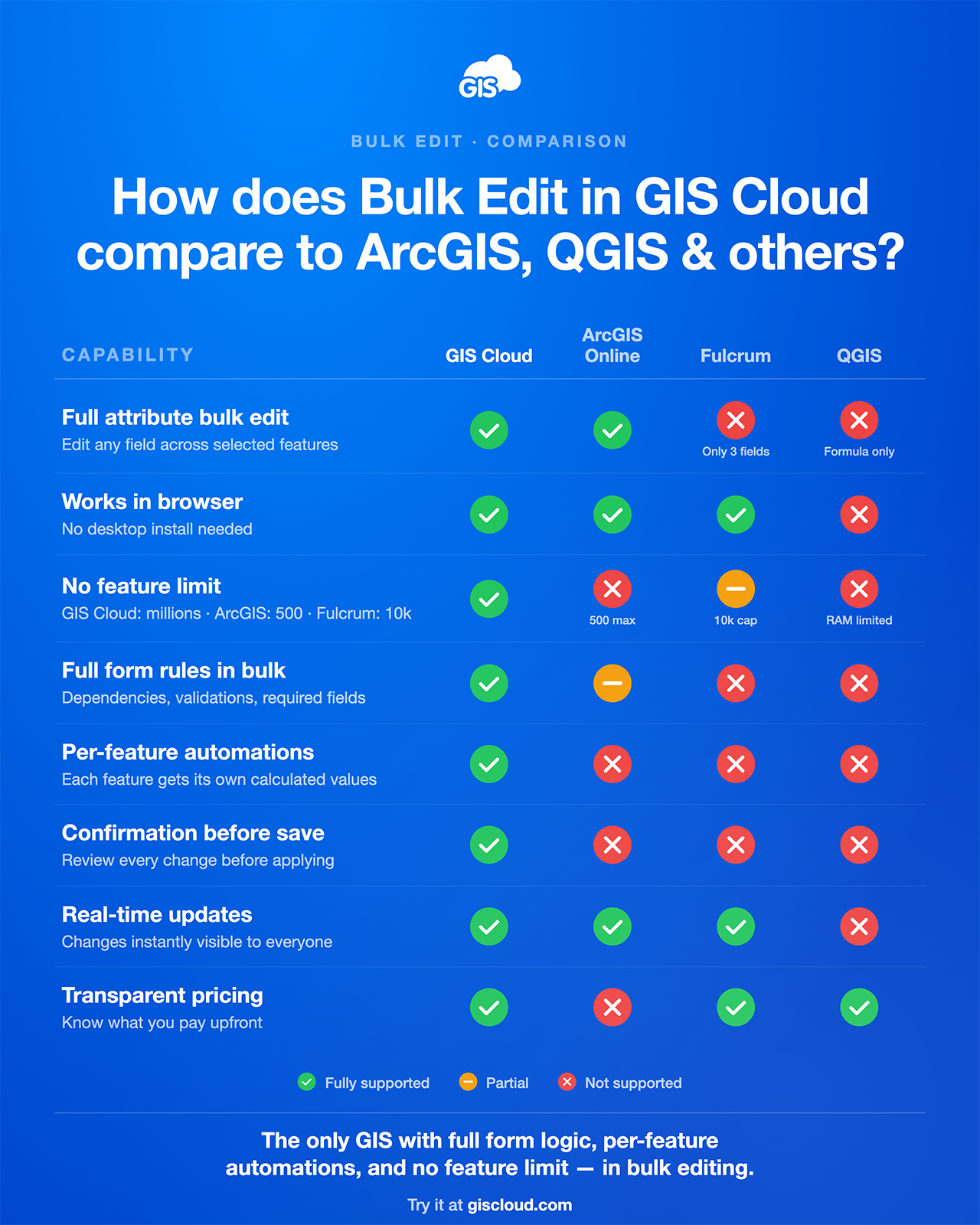
What this means for your workflow
If your team’s bulk editing needs are simple — update a status on a few dozen features, no form rules involved — most of these tools will get the job done.
But if you need bulk editing that actually respects your form configuration, handles automations per feature, and scales beyond 500 records without workarounds — that combination currently exists only in GIS Cloud.
The difference isn’t theoretical. It’s the difference between:
- Updating 2,000 inspected assets in one operation vs. batching them 500 at a time
- Having automations calculate per-feature values vs. manually fixing blanket overwrites
- Reviewing a change summary before saving vs. hoping you didn’t overwrite the wrong field
Try it
Bulk editing is available now in GIS Cloud Map Editor. It works on any layer — with or without a configured form.
For a step-by-step guide, see our Learning Center tutorial.
This comparison is based on publicly available documentation as of May 2026. ArcGIS Online bulk edit capabilities were introduced in February 2025 and expanded in June 2025. If any information here is outdated, we’re happy to update it — reach out at info@giscloud.com.