
Your GIS,
now generative
GIS Cloud AI turns a sentence into action across the whole workflow: capture in the field, build collection projects, maps, layers, analysis, custom apps and reports. Connect AI clients like Claude or ChatGPT to your data. Inside the platform your team already uses. The AI proposes, you confirm. ISO 27001 certified.
Ask AI: Talk to your data
Work with your spatial data in plain language: count, filter, rank and aggregate across several layers and maps in one conversation.
Select or classify features; create maps, layers and forms; build a complete data-collection project from one sentence. Type or speak, in any language. It proposes; you confirm.
- Query, create, classify and select in plain language
- Works in Map Editor, Viewer, Contributor, MDC Portal & Manager
- Build a full data-collection project from one sentence
AI Form Fill: From a photo or your voice
Take a photo of an asset; AI reads visible text and barcodes and suggests values for your fields, with a confidence level on each. Or describe what you see using your voice.
Review or edit before saving, and each extra photo sharpens the result.
- Reads visible text & barcodes from a photo
- A confidence level on every suggested value
- MDC mobile app & web Editor, including bulk updates
AI App Builder:
Describe it. Deploy it.
Describe a reporting app, a monitoring dashboard or a city portal and it's generated, then refined through conversation. Generated apps can include a branded PDF report export.
- Full app scaffolding: map, forms, branding
- Branded PDF report export
- Refine by conversation, no code
Connect your own AI client via MCP
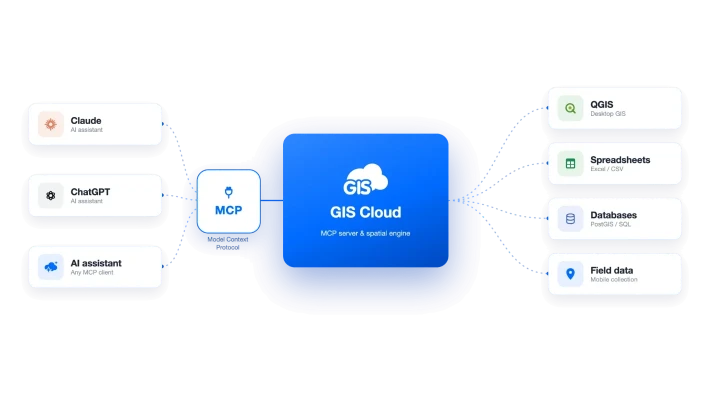
Connect clients like Claude or ChatGPT to your GIS Cloud data via MCP. Generate reports and analysis from your own verified data without leaving the assistant, while you control exactly what each client can access. Private by default; write and destructive actions are confirmed.
- Private by default · per-resource authorization
- Reports generated inside your AI client
- Write & destructive actions require confirmation
"The AI selection tools are brilliant. It saved me having to use desktop GIS. For one selection, manually it would have taken an hour, AI did it in less than a minute. Very impressive."

How it works
Three ways to talk to your maps
Type or speak a request
Describe what you want in plain language: a layer, an analysis, a whole app. Type it or say it, in any language.
Review what it proposes
AI shows its proposed maps, layers and values on the canvas, with a confidence level where it matters. Nothing is saved yet.
Confirm, refine & share
Approve what's right, adjust by conversation, then publish to a link or your field crews. You stay in control.
AI proposes; you confirm.
Every value or action is a suggestion you review before it's executed. Backed by ISO 27001- certified security.
Who it's for
One assistant, every seat
Office teams
Query, analyze, classify and build maps and forms in plain language.
Field crews
Fill forms from a photo or voice: offline-first on mobile, synced to one live map.
AI-native teams
Connect the AI client they already use, Claude or ChatGPT, via MCP.
AI isn't switched off, but as the data owner you decide whether third parties can run AI read or write operations on data you've shared, for AI over MCP (Claude, ChatGPT) and Mobile Data Collection.
Read about our securitySee GIS Cloud AI
in your own data
Connect your maps and start asking. AI proposes; you confirm.