


A single click solution to get your maps from desktop to the Cloud!
The extension is free and compatible with Esri ArcMap 9.x and 10.x. You can download it from the following link: [Download not found]
Publishing GIS projects with traditional GIS tools is not easy. You have to set up your own server, being that a server from a commercial vendor or open-source, and follow that with maintaining the server and services, uploading your data from desktop, reconfiguring maps and generating tiles to be optimized for the Web, not to mention mobile and tablets. All these are, for the most part, daunting and/or expensive tasks.

A map in ArcMap
GIS Cloud already gives you a way to easily build and publish your maps on the Cloud, but there are still lots of maps and projects sitting on your desktops. Of course it is possible to upload all that data to GIS Cloud, but then you would have to go through the process of creating and setting up those maps once again.
We have always been focused on making your GIS workflows more efficient to save you time and money. Therefore we are releasing today a GIS Cloud Publisher extension for one of the most popular desktop GIS tools out there: Esri ArcMap
The GIS Cloud Publisher for ArcMap extension enables you to publish your maps from ArcMap to GIS Cloud with only one click. It automatically uploads your data, symbology, layer structure and spatial references. The idea is that what you see in your desktop GIS is instantly replicated on your GIS Cloud account. Once your maps and data are on GIS Cloud, they are easily published to the public or embedded into your website/blog without a need for having your own servers.

GIS Cloud Publisher Extension
Not everything is supported just yet. This is what we have so far:
- maps and layers can be created and afterwards updated
- you can choose which layers to export
- your upload is secure through an SSL connection
- all your vector data can be uploaded, regardless of the datasource
- labels – these end up with a generic look only in GIS Cloud for now
- point layer symbology support almost at 100%
- simple line symbols – only solid lines
- simple fill symbols – only single color fills
- but! you’re free to use unique value categories or graduated color symbology
After one click your entire map with the data is in GIS Cloud:
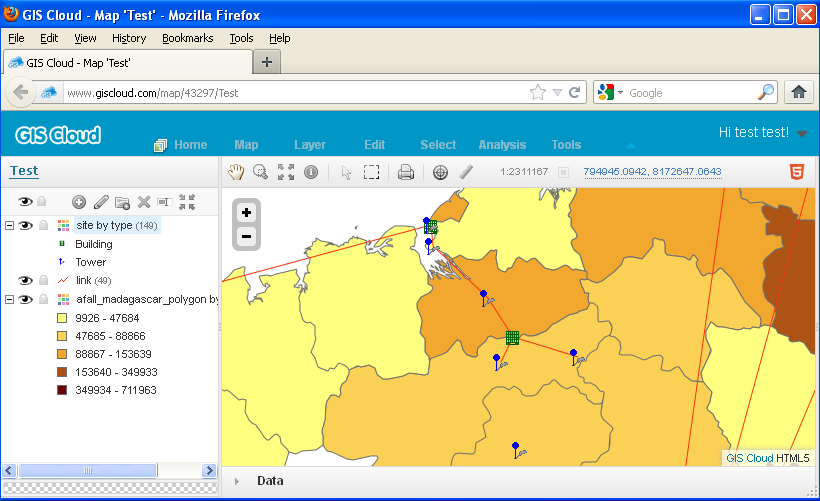
Your desktop GIS map on GIS Cloud
The extension is free and compatible with Esri ArcMap 9.x and 10.x. You can download it from the following link: [Download not found]